
Here’s What Shopify Retailers Need to Know
Collections are one of those parts of Shopify that quietly do a lot of heavy lifting.
They help customers navigate your catalogue, discover relevant products and move from “I’m just looking” to “that’s exactly what I need”.
But behind the scenes, managing them hasn’t always been quite so straightforward.
Until now, Shopify merchants have generally had to choose between an automated collection, built using a fixed set of rules, or a manually curated collection where every product is selected and reordered individually.
If you wanted automation and control, things could quickly become complicated. You might end up duplicating collections, relying on product tags, installing another app or asking a developer to create a workaround.
Shopify’s new Collections experience changes that.
Collections can now bring together multiple product sources,automatic conditions, individual variants, manual selections and exclusions. They can also be reused across other collections and Shopify workflows.
It may sound like a fairly functional admin update, but for retailers with larger catalogues, regular campaigns or more sophisticated merchandising strategies, it could make a significant difference.
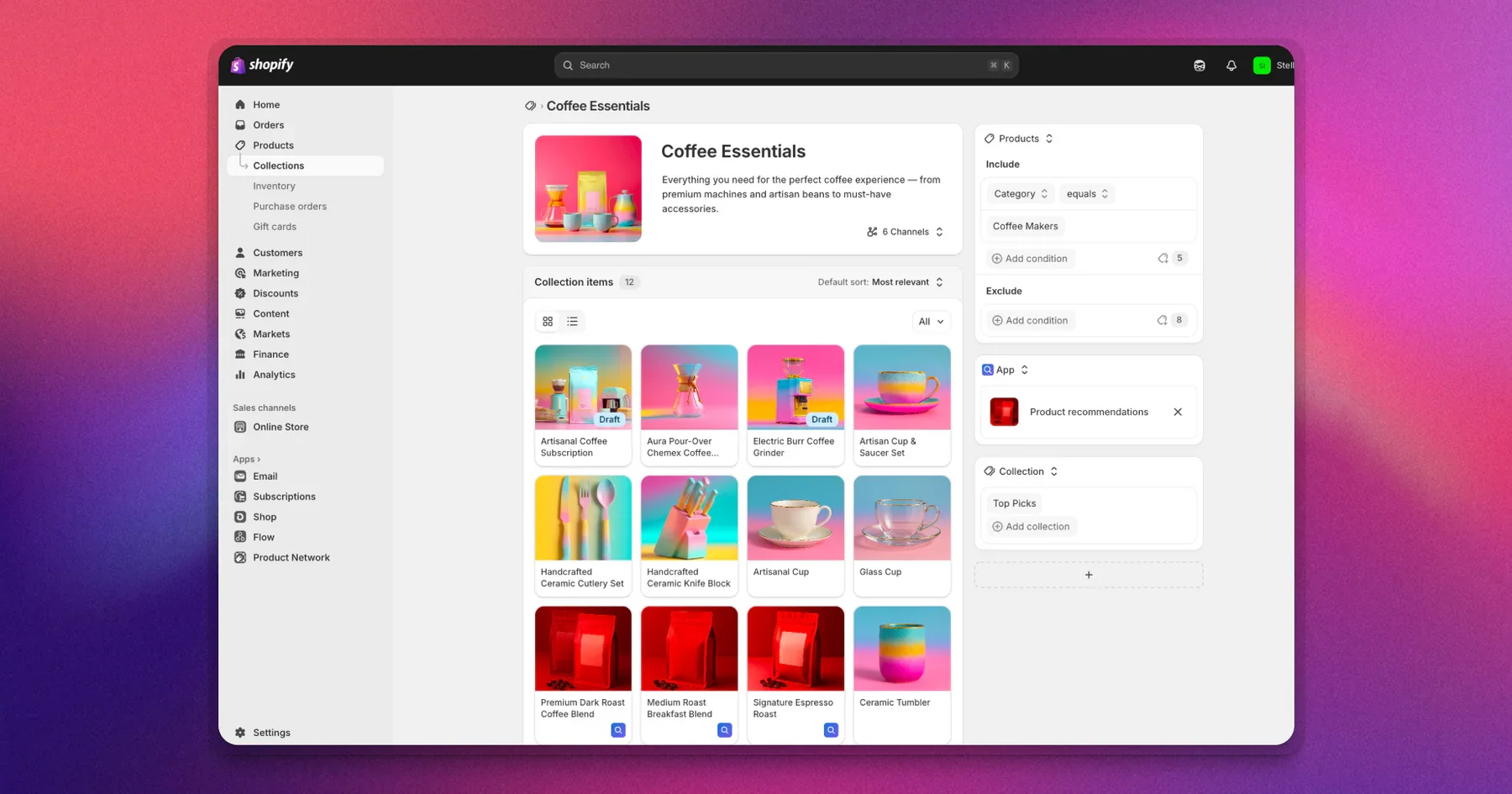
Image Source - Shopify
Automated doesn’t have to mean inflexible
Previously, creating an automated Shopify collection meant defining a set of conditions and allowing every matching product to appear.
That was useful, but quite rigid.
If a product matched the rules, it was included. If it didn’t, it wasn’t. Merchants had limited ability to curate the collection without changing its underlying conditions or switching to a completely manual setup.
The updated experience allows you to combine automatic rules with products you have selected yourself.
For example, a New Arrivals collection could automatically include recently published products while allowing your merchandising team to pin a handful of priority products at the top.
You get the efficiency of automation without giving up control over the customer-facing experience.
That balance is important. Good merchandising isn’t simply about displaying every technically relevant product. It is about deciding which products customers should see first and creating a clear route through the collection.
Create collections using multiple sources
A single collection can now draw products from several different sources.
These could include:
Products matching automatic conditions
Products selected manually
Products pulled from another collection
Product sources maintained by compatible Shopify apps
You can then decide how those sources work together, apply exclusions and control the order in which products are displayed.
Imagine you’re preparing a summer campaign. You could automatically include products from your summer range, manually add a few bestsellers and exclude items that are running low on stock.
Previously, that campaign might have required a separate collection that somebody had to regularly check and update. Now, much more of that work can happen automatically.
This should make campaign collections easier to launch and considerably easier to maintain.
Exclude products without rebuilding the collection
The ability to exclude particular products is a small change with plenty of practical uses.
A sale collection could automatically include products with a reduced price while excluding:
Low-stock products
New-season arrivals
Premium ranges
Products already included in another promotion
Bestsellers you don’t want to discount
This gives retailers much tighter control over promotional activity.
It also reduces the risk of a product being added to a campaign simply because it happens to meet a broad collection rule.
Merchandise individual product variants
This is one of the most useful additions.
Shopify collections can now target specific variants rather than always including the entire product.
Let’s say a dress is available in six colours, but you’re creating a red edit for Valentine’s Day. Instead of displaying the product and expecting customers to find the relevant option, the collection can feature the red variant specifically.
The same idea could be used for:
Seasonal colour edits
Size-specific promotions
Clearance variants
Material or finish collections
Location-specific stock
Gift guides based on a particular style or colour
Variant-level collections can be used across the online store, Shopify POS and the Shop app, helping retailers create a more consistent experience across different sales channels.
This is especially valuable for fashion, footwear, interiors and gifting brands, where the variant itself can be just as important as the overall product.
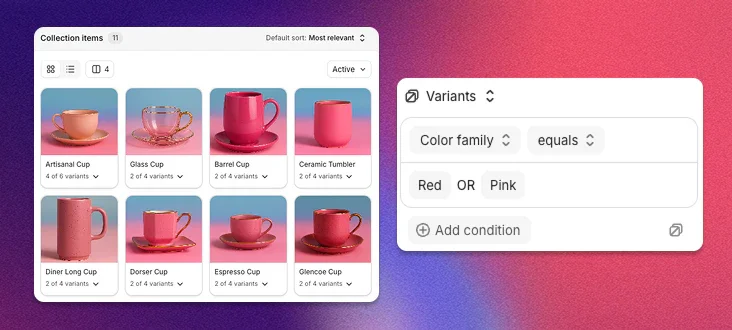
Image Source - Shopify
Use existing collections as building blocks
Collections can now be built from other collections.
For example, an Activewear collection could combine your existing Leggings, Tops and Shorts collections. When one of those original collections changes, the wider Activewear collection updates too.
This removes the need to recreate and maintain the same product selections in several places.
For larger Shopify stores, this could make catalogue management much more scalable. Core product groups can be created once and then reused within seasonal campaigns, navigation, landing pages and promotional edits.
The result should be fewer duplicated lists, fewer inconsistencies and less manual housekeeping.
Connect app data to your collections
Compatible Shopify apps can also provide product sources for collections.
That means information such as bestselling products, trending items or products excluded from promotions could potentially feed directly into your merchandising.
A bestseller app, for example, could maintain one live product source that is then used across a homepage collection, a promotional landing page and other workflows.
Rather than rebuilding the same selection in several places, the source is defined once and kept up to date automatically.
How useful this becomes will depend on the apps retailers use and how quickly developers adopt the new functionality, but it opens up some interesting opportunities for more responsive, data-led merchandising.
Ask Sidekick to build collections for you
Shopify Sidekick can help merchants create and edit collections using natural-language instructions.
You could ask Sidekick to create a collection containing products published within the last 14 days. It can then set up the necessary tagging, automation and collection conditions for you to review.
For teams managing frequent product launches or campaigns, this could remove a lot of repetitive setup.
As always with AI-supported tools, we would recommend reviewing the output before publishing. Sidekick can speed up the process, but the commercial thinking behind a collection, what it is for, who it serves and which products should take priority still needs human input.
Collections can support more than website navigation
Collections are no longer limited to powering customer-facing category pages.
They can also be used within discounts, tax rules and internal workflows.
A retailer could use a variant-based collection to apply a promotion to selected sizes. Another collection might group products scheduled to be discontinued without ever appearing in the store’s navigation.
This makes collections a much more useful way to organise products across the wider store setup.
It also means that the way collections are structured should be considered more strategically. They are becoming reusable building blocks that can influence merchandising, promotions and operational workflows, not simply lists of products displayed on your website.
A redesigned Collections admin
Shopify has redesigned the Collections area to make products easier to view, arrange and manage.
Merchants can switch between grid and list views, drag products into a preferred order and sort them by factors such as price or title.
This should make visual merchandising much more intuitive, particularly for teams that want to see how a collection fits together rather than working through a long list of product names.
The existing collections in your store will carry over automatically, so you don’t need to delete or rebuild them before using the new tools.

Image Source - Shopify
What should you do next?
There is no need to restructure every collection immediately.
Start by looking at the areas of your store that currently require the most manual work.
That might include:
New-arrival collections that need updating every week
Seasonal edits that combine several product categories
Sale collections that require regular stock checks
Gift guides that need products arranged in a particular order
Colour or size campaigns that currently link to whole products
Product groups duplicated across several campaigns or workflows
These are likely to be the best places to test the new functionality and assess how much time it could save your team.
It is also worth reviewing whether any custom or third-party apps interact with your collections.
Our view
This is a genuinely useful update.
The most important change isn’t simply that Shopify Collections can now do more. It is that retailers no longer have to choose so often between automation and thoughtful merchandising.
Automation helps keep a catalogue accurate and manageable. Curation helps create a more relevant and persuasive shopping experience. The new Collections setup allows the two to work together much more effectively.
Used well, it could help you launch campaigns faster, reduce repetitive admin and create collection pages that feel much more intentional.
The technology is only the starting point, though.
A collection still needs a clear purpose. It needs to reflect how customers shop, prioritise the right products and give people a helpful route towards making a purchase.
If you’d like help reviewing your Shopify collections, improving your site navigation or using the new functionality as part of a wider conversion strategy, Get in touch.